|
|
||
|---|---|---|
| .assets/images | ||
| backend | ||
| frontend | ||
| k8s | ||
| dev.env | ||
| docker-compose.yml | ||
| LICENSE.txt | ||
| prod-build.sh | ||
| prod-deploy.sh | ||
| README.md | ||
| TODO.org | ||




Backend:


Frontend


Usage
- Local setup is supported via Docker Compose
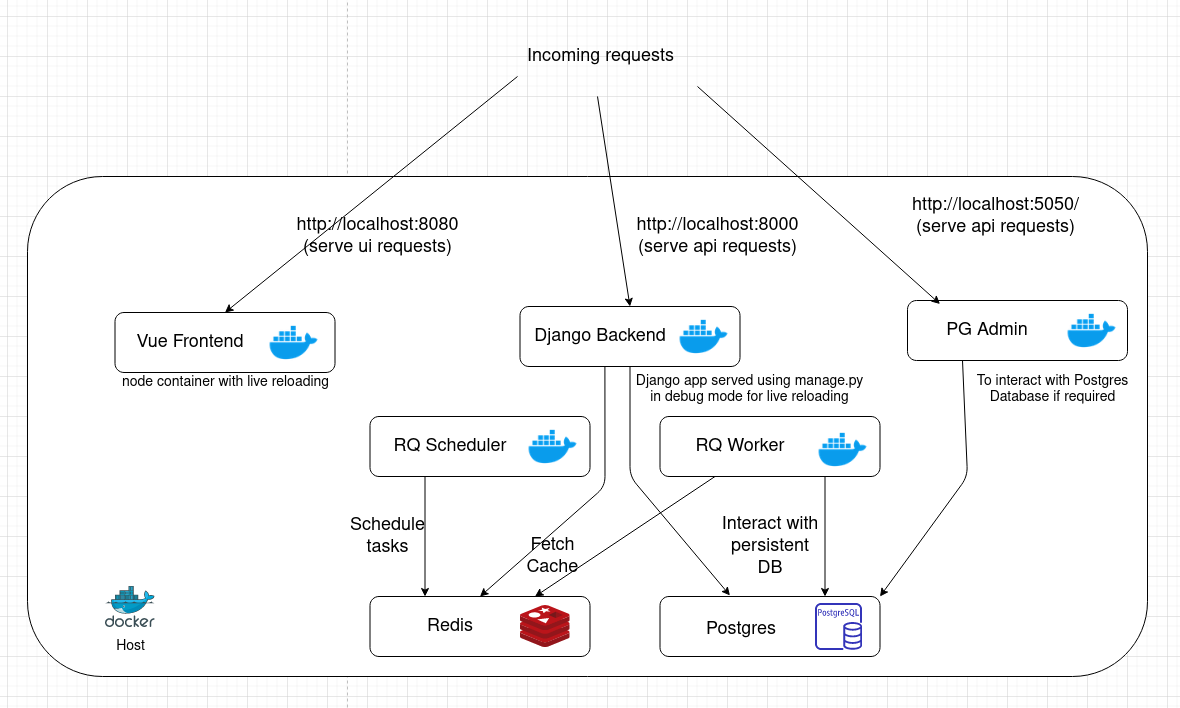
docker-compose up -d
Build
- Build images for dev
docker-compose build
- Build images for prod
./prod-build.sh
Logging
To get the logs of all containers
docker logs -f
To get the logs of a particular container
docker logs -f container-name
Here container-name can be either of backend, frontend, redis,
postgresql, rqworker or rqscheduler.
Debugging
- To goto Django's shell to debug you may use
docker-compose exec backend python manage.py shell
- To create migrations
docker-compose exec backend python manage.py makemigrations
- To run migrate
docker-compose exec backend python manage.py migrate
- To run unit tests
docker-compose exec backend python manage.py test
Similarly all django commands can be run this way.
Endpoints
There are 5 available endpoints:
- Empty Response Endpoint - to intentionally get an empty response from the server
- Directly from BSE - fetchs the data directly from the BSE website
- Postgres Endpoint - fetches the data from Postgres
- Redis Cache and Redis Cache v2 - both fetch data from redis, however there is
a slight differece in the way they store data.
- In the 1st case a LIST is stored maintainig the list of stocks for a given day, and a HASHMAP for every stock is stored
- In the v2 endpoint, the entire JSON response for a day is stringified and stored The reason for implemnting two different endpoints, was to just check the response times.
Deploy
The recommended way for deploy is on Kubernetes. You can find the related files
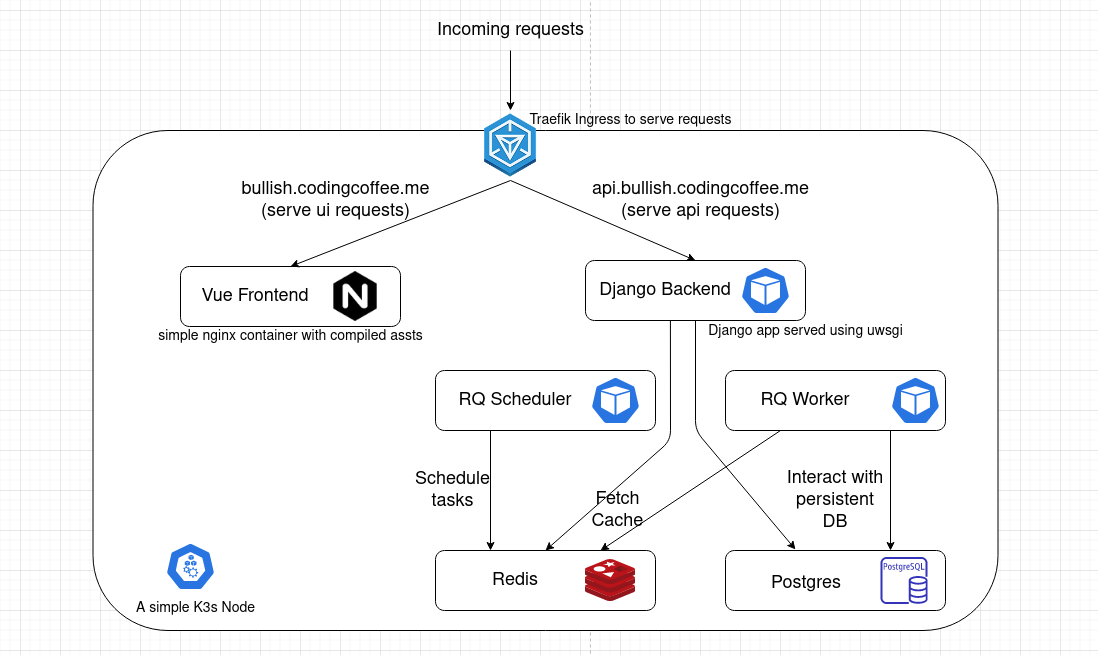
in k8s directory.
Before deploy create a secret.yaml file in k8s/app, with base 64 encoded
secrets. A sample file named sample-secret.yaml has been committed listing all
the required variables. Change the secrets preset in the file before using it.
- One time deploy
# Deploy ingress
kubectl apply -f k8s/ingress/ingress-https.yaml

# Deploy secrets
kubectl apply -f k8s/app/secret.yaml

# Deploy Postgres and Redis DB
kubectl apply -f k8s/app/redis.yaml
kubectl apply -f k8s/app/postgres.yaml

# Deploy Backend
kubectl apply -f k8s/app/backend.yaml
kubectl apply -f k8s/app/rqworker.yaml
kubectl apply -f k8s/app/rqscheduler.yaml

# Deploy Frontend
kubectl apply -f k8s/app/frontend.yaml
- Subsequent deploys can be done by rolloing out a restart since all pods have a
imagePullPolicyset toAlways
# Push containers to Docker Hub and Deploy to K8s
./prod-deploy.sh
Contribution
Have better suggestions to optimize the image? Found some typos? Go ahead and send in a Pull Request! Contributions of any kind welcome!
License
The code in this repository has been released under the GNU Affero General Public License v3
Attributions
- Bullish icon made by Freepik from Flaticon
